
Tools and access groups
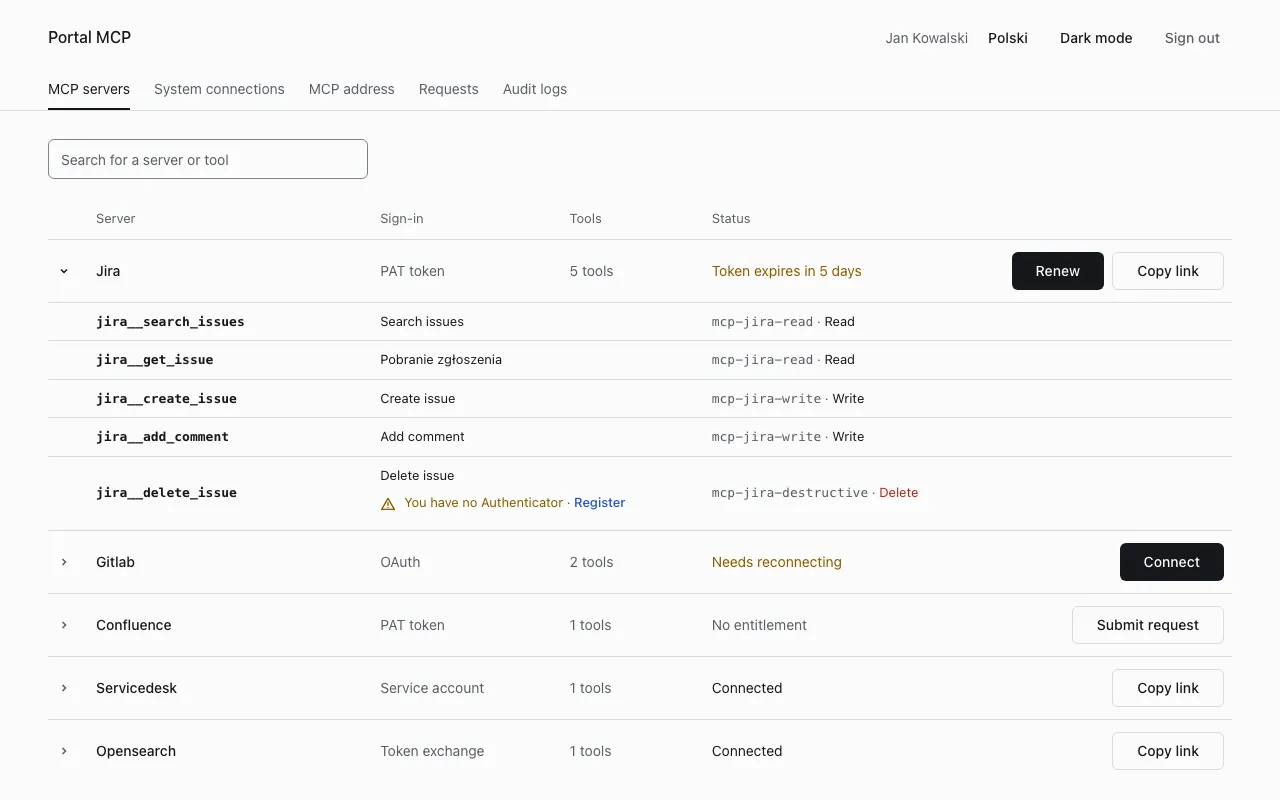
Claude Code sees a tool as <system>__<tool>, for example jira__get_issue. The portal page MCP servers lists the servers and, after you expand one, its tools. Each tool row shows the group the tool needs and its risk (Read, Write or Delete), and says why a tool is unavailable.
How access works
Section titled “How access works”You get access through groups at the identity provider. There are two kinds:
| Kind | Example | What it gives |
|---|---|---|
| tool group | mcp-jira-read, mcp-jira-write, mcp-jira-destructive |
the read tools, the tools that change data, the tools that delete data (always with a code) |
| scope group | mcp-jira-proj-ABC, mcp-gitlab-grp-team-a |
one project, GitLab group, space, index prefix or queue |
The names above are the ones the server repositories use. Your administrator can name them differently, and the portal shows the exact group of each tool. A scope group works through the scope mapping that the administrator keeps in the portal, so ask your administrator which group gives which project. To get a group, see Access requests.
A tool you cannot call is hidden from the list. A tool that needs a code is listed, and its call asks you to confirm: see Confirm a destructive operation.
A new group reaches the platform with your next token. Sign in again in Claude Code (/mcp) to see it.
Tools per server
Section titled “Tools per server”The tools below are the ones of the current server versions (2.0.0). Arguments and results are described in the repository of each server.
32 tools. Source: mcp-server-jira. Jira Data Center 9.12 to 11.x. You connect with a personal access token. Read tools need mcp-jira-read, write tools mcp-jira-write, delete tools mcp-jira-destructive. Writes are allowed only in projects that are mapped to your groups, for example mcp-jira-proj-ABC. Projects of the category restricted are closed to everyone.
| Access | Tools |
|---|---|
| Read | get_issue, search_issues, get_issue_changelog, list_comments, list_transitions, list_link_types, list_worklogs, list_attachments, read_attachment, list_projects, get_project, list_statuses, list_issue_types, get_create_fields, find_assignable_users, list_boards, list_sprints, list_sprint_issues, get_current_user |
| Write | create_issue, update_issue, assign_issue, unassign_issue, add_comment, edit_comment, transition_issue, link_issues, add_worklog, add_watcher, unwatch_issue |
| Delete (code) | delete_issue, remove_issue_link |
search_issues takes structured arguments for one project, not raw JQL. read_attachment returns text files only.
Confluence
Section titled “Confluence”24 tools. Source: mcp-server-confluence. Confluence Data Center 8.5 to 10.x. You connect with a personal access token. Groups: mcp-confluence-read, mcp-confluence-write, mcp-confluence-destructive. Writes are allowed only in spaces and page trees mapped to your groups, for example mcp-confluence-space-ENG. Spaces labelled restricted are closed to everyone.
| Access | Tools |
|---|---|
| Read | search_pages, search_content, get_page, get_page_by_title, list_pages, list_child_pages, get_space_page_tree, get_page_restrictions, list_page_versions, get_page_version, diff_page_versions, list_comments, list_labels, list_attachments, read_attachment, list_spaces, get_space |
| Write | create_page, update_page, move_page, add_comment, reply_to_comment, add_label |
| Delete (code) | delete_page (moves the page to the trash) |
update_page takes expectedVersion and refuses a stale one.
GitLab
Section titled “GitLab”37 tools, none of them deletes anything. Source: mcp-server-gitlab. GitLab CE and EE 17.0 to 19.x. You connect with OAuth or a personal access token. Groups: mcp-gitlab-read, mcp-gitlab-write. Writes are allowed only in GitLab groups mapped to your groups, for example mcp-gitlab-grp-team-a. Groups and projects with the topic restricted are closed to everyone. Strings that look like credentials in job logs and artifacts are replaced by [redacted].
| Access | Tools |
|---|---|
| Read | list_projects, get_project, list_project_members, list_labels, get_file, list_repository_tree, search_code, list_branches, list_tags, list_releases, list_commits, get_commit, get_commit_diff, list_issues, get_issue, list_issue_notes, list_merge_requests, get_merge_request, list_merge_request_diffs, list_merge_request_notes, list_pipelines, get_pipeline, list_pipeline_jobs, get_job_log, get_job_artifact_file, get_current_user |
| Write | create_branch, create_issue, update_issue, comment_issue, create_merge_request, update_merge_request, comment_merge_request, approve_merge_request, merge_merge_request, retry_pipeline, cancel_pipeline |
OpenSearch
Section titled “OpenSearch”11 tools, all read-only. Source: mcp-server-opensearch. Nothing to connect: the platform exchanges your token for an OpenSearch token. Needs mcp-opensearch-read and at least one index prefix group, for example mcp-opensearch-idx-logs-team-a, which opens logs-team-a and logs-team-a-*. The tools marked ops also need mcp-opensearch-ops.
| Tool | What it does |
|---|---|
search_logs |
searches the logs of an index prefix in a time range |
count_logs |
counts documents that match a filter |
aggregate_logs |
counts documents by level, service or host |
find_log_patterns |
groups the messages of a sample into patterns |
get_document |
returns one document by index and id |
list_indices |
lists the indices of a prefix with their health |
get_index_mapping |
returns the fields of one index |
validate_query |
asks OpenSearch whether it accepts the query the server would build |
get_index_stats (ops) |
document count, store size and totals per index |
get_cluster_health (ops) |
status, node and shard counts |
get_backend_info (ops) |
version and features found by the version probe |
No tool takes a query, an API path, SQL or PPL.
Service desk
Section titled “Service desk”3 tools. Source: mcp-server-servicedesk. Nothing to connect: the platform calls the service desk with its own service account. Groups: mcp-servicedesk-read, mcp-servicedesk-write, and a queue group such as mcp-servicedesk-queue-IT. No setting opens a queue without that group.
| Access | Tool | What it does |
|---|---|---|
| Read | search_tickets |
searches the tickets of one queue for a text, up to 20 results |
| Read | get_ticket |
returns one ticket |
| Write | add_note |
adds a note to a ticket |
The service desk sees the author of a note as the platform’s service account, so every note starts with the line [Added through the MCP platform on behalf of <user>].
Servers added by your administrator
Section titled “Servers added by your administrator”Administrators can add other servers. A server built on the adapter (guide) offers the tools of a third-party MCP server, and only its read-only tools work. Open MCP servers to see what exists in your installation.