
Add the platform to Claude Code
The platform has one MCP address for all systems: https://<platform>/mcp. <platform> is the host your administrator gave you, the same host as the portal.
Claude Code needs a gateway of version 2.0.1 or newer. With gateway 2.0.0 Claude Code on MCP 2026-07-28 shows the server with no tools. If you see this, tell your administrator to upgrade.
Add the server
Section titled “Add the server”-
Open the portal page MCP address.
-
Select Copy next to the command on the Claude Code tab.
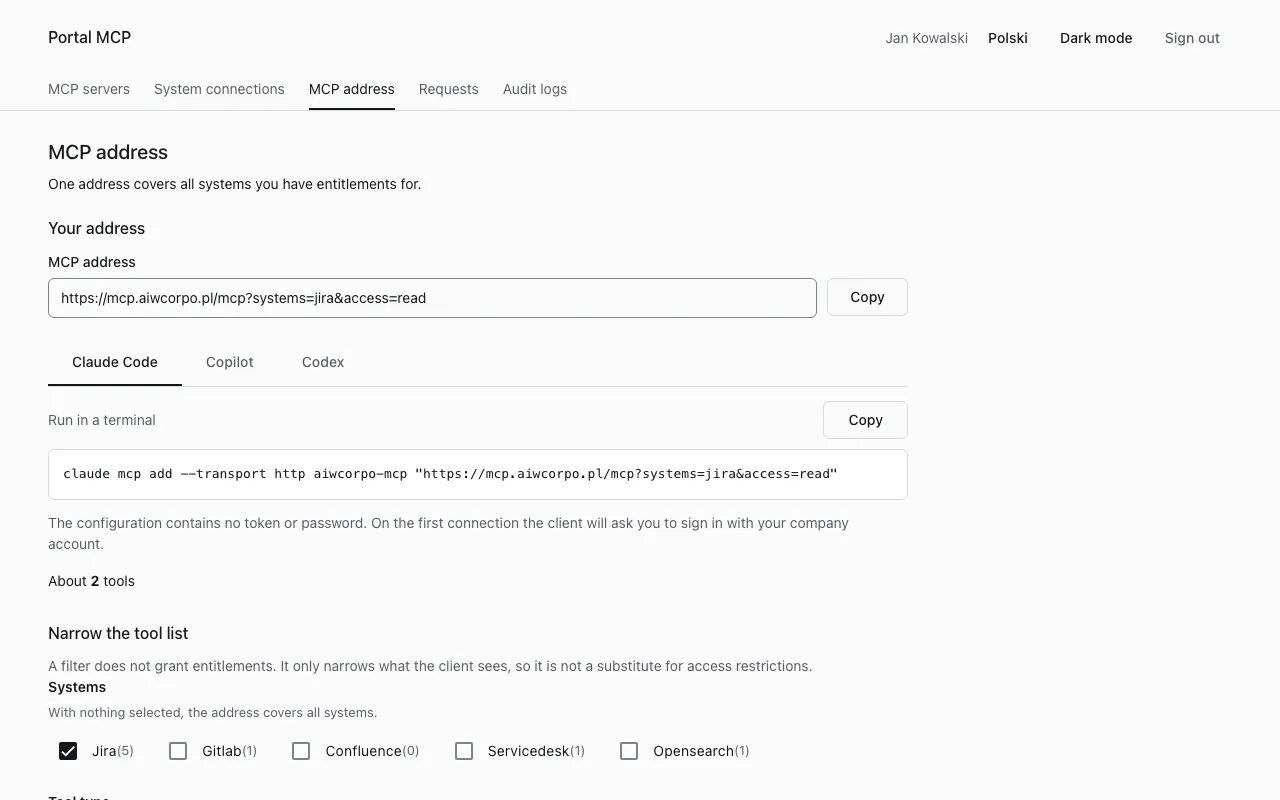
-
Run the command in a terminal:
Terminal window claude mcp add --transport http aiwcorpo-mcp "https://<platform>/mcp"The address is in quotation marks because a filter in it contains
&.
If your administrator registered a fixed client for Claude Code at the identity provider (the platform bundle does this), the portal adds two flags to the command:
claude mcp add --transport http --client-id claude-code --callback-port 33418 aiwcorpo-mcp "https://<platform>/mcp"--client-id is the public client registered for Claude Code. --callback-port is the local port of its redirect address (http://localhost:33418/callback by default). The port must be free on your computer while you sign in. An identity provider that does not allow dynamic client registration needs both flags, so use the command exactly as the portal shows it.
Sign in
Section titled “Sign in”- Start
claudeand run/mcp. - Select the server
aiwcorpo-mcpand choose Authenticate. The browser opens the company sign-in page. - Sign in with your password and OTP. The browser returns to
localhostand the server shows as connected.
Tool names have the form <system>__<tool>, for example jira__get_issue. The lists are in Tools and access groups.
If another person used Claude Code on the same computer, choose the server in /mcp, clear the authentication and sign in again.
A system you have not connected yet keeps its tools on the list. The first call answers credential_required with a link to the portal. See Connect your account.
Narrow the tool list
Section titled “Narrow the tool list”A long tool list uses model context, and a session that reaches several systems lets text from one push the model to act in another. The portal page MCP address builds an address that shows fewer tools. The page stores nothing.
| Parameter | Value | Effect |
|---|---|---|
systems |
system ids, comma separated, for example jira,gitlab |
only tools of these systems |
tools |
<system>__<tool> names, comma separated |
only these tools |
access |
read or write |
read: read-only tools. write: tools that change or delete data |
exclude |
system ids or tool names | removes them from the result |
Example, read-only Jira tools:
claude mcp add --transport http aiwcorpo-mcp "https://<platform>/mcp?systems=jira&access=read"The query may have at most 512 bytes, up to 5 systems and 100 tools per parameter. For longer choices select whole systems or use exclude. A filter never grants access, it only narrows what the client sees. A tool outside the filter answers not_found_or_denied, the same as a tool that does not exist.
The gateway returns 100 tools per page. The portal warns when the list is large.
Company CA certificate
Section titled “Company CA certificate”If the platform certificate comes from your company CA, Claude Code (Node.js) must trust that CA. Otherwise the sign-in or the connection fails with a certificate error, or the browser step ends with a refused connection to localhost:33418. Your administrator gives you the CA file.
Set NODE_EXTRA_CA_CERTS in the shell that starts claude:
export NODE_EXTRA_CA_CERTS=/path/to/company-ca.crtclaudeClaude Code reads NODE_EXTRA_CA_CERTS from the env block of ~/.claude/settings.json before the shell variable. If that block sets it to another file, the export has no effect. Change the value there.
On macOS, Node does not read the keychain, so adding the CA to the keychain is not enough for Claude Code.
Windows
Section titled “Windows”In PowerShell, set the variable for the current window and start Claude Code from it:
$env:NODE_EXTRA_CA_CERTS = "C:\certs\company-ca.crt"claudeTo keep it for new windows:
setx NODE_EXTRA_CA_CERTS "C:\certs\company-ca.crt"setx does not change the window you run it in. Open a new one afterwards. Use the full path of a PEM file.
Other clients
Section titled “Other clients”The portal tabs Copilot and Codex show a snippet with the address only, for .vscode/mcp.json and ~/.codex/config.toml. Whether such a client can sign in depends on your identity provider: it must accept the client’s id and support OAuth with protected resource metadata (RFC 9728). Ask your administrator which clients are admitted.
Problems
Section titled “Problems”| Symptom | Cause | What to do |
|---|---|---|
| the server shows no tools | gateway 2.0.0, or a filter in the address that leaves nothing | ask for gateway 2.0.1 or newer. Compare your address with MCP address in the portal |
certificate error, or ERR_CONNECTION_REFUSED on localhost:33418 after the browser step |
Claude Code does not trust the company CA | set NODE_EXTRA_CA_CERTS as above |
the browser shows an error on localhost:<port> after sign-in |
the callback port is used by another program | free the port, or ask for another fixed port |
| a tool you expect is missing | no group, a switched-off tool or an unapproved definition | open MCP servers in the portal and expand the server: each tool row says why it is unavailable |
| new groups do not show up | the token of the client is old | sign in again in /mcp |