
Add and manage systems
A system is data of the credential broker: the address of a product and the way the broker gets a credential for it. An MCP server is a separate program with tools, and its manifest names the system it uses. Without the system, users have nothing to connect and tool calls fail. Add the system before you approve the server (see Add and approve a server).
Everything on this page is in the portal under Administration, Systems. You need the group mcp-platform-admin. The broker picks up a change within 5 seconds, without a restart.
Add a system
Section titled “Add a system”- Open Administration, Systems and select Add system.
- Enter the System identifier: 2 to 31 lower case letters and digits, starting with a letter. It must equal the system named in the server manifest (for example
jira). It cannot be changed later. The identifiersgateway,offboarding,portal,broker,prometheus,platform,admin,registry,adapter,internalandciare reserved. - Optionally enter a Display name (1 to 64 characters). The administration pages show it instead of the identifier.
- Choose the Adapter (table below).
- Enter the Base address of the product. It must start with
https. - Fill in the fields that the chosen adapter needs (next sections).
- Select Save. If the portal asks for it, confirm your identity at the identity provider: saving a system needs a fresh MFA, and the form comes back after the trip. The client secret is not kept on the way, so enter it again.
Choose the adapter
Section titled “Choose the adapter”The adapter decides how the broker talks to the product, which credential types are possible and how a user’s token is checked when the user stores it.
| Adapter | Credential types | Check of a stored secret (whoami) |
|---|---|---|
atlassian-dc (product jira or confluence) |
PAT token (user-secret) |
Jira: GET /rest/api/2/myself. Confluence: GET /rest/api/user/current |
gitlab |
PAT token (user-secret), OAuth (user-oauth) |
GET /api/v4/user |
opensearch |
Token exchange (token-exchange) |
None. The broker exchanges the user’s token at the identity provider for the audience of the system |
generic-rest |
Service account (service-account) or PAT token (user-secret), one of them |
GET <base address><check path> when you set a Check path |
The check runs when a user stores a token. A 2xx answer stores it. 401 or 403 rejects it (secret_invalid). Any other answer is upstream_unavailable and nothing is stored.
Fields
Section titled “Fields”| Field | When it appears | Meaning |
|---|---|---|
| Product | atlassian-dc |
Jira or Confluence. Decides the whoami call |
| Credential type of this system | generic-rest |
One choice: PAT token or Service account. No OAuth, and no mix |
| Check path (optional) | generic-rest with PAT token |
Path on the base address, starting with a single slash, no host, no query, no .. (for example /api/me). Without it the token is stored without a check and the connection shows no account |
| User name field of the answer | generic-rest with PAT token |
Field of the answer with the user name, or a JSON pointer such as /user/login |
| Supported credential types | other adapters | Check the types the system accepts. A service account cannot be combined with a user type. A token exchange system cannot be combined with other types |
| Default type | always | One of the supported types |
| Scheme of the secret handed to the gateway | always | Bearer, Basic, Token or ApiKey: how the credential goes into the header towards the server |
| Scheme of the user’s token | PAT token | As the scheme above, Bearer or Basic. With Basic the connection form asks users for a login next to the token (Jira Data Center with login and password, for example) |
| Audience of the exchanged token | token exchange | Required. It must match the broker setting broker.token-exchange.allowed-audiences (exact values or patterns with *). The setting is empty by default, and then no token exchange system can be created |
| Revoke address (optional) | always | https address called when a user disconnects (OAuth) |
| Timeout of calls (optional) | always | ISO 8601 duration of at most 10 minutes, for example PT30S |
| Client identifier, Client secret, Token address, OAuth scopes (separated by spaces) | OAuth or token exchange | The OAuth client the broker uses at the product. A token exchange system takes no token address: the broker uses the token endpoint of its identity provider |
| Authorization address | OAuth | Address where the user signs in to the product |
All addresses are https. Plain http is possible only with the broker setting allow-plain-http, which is meant for a development stack.
Client secret
Section titled “Client secret”The client secret goes to the broker’s secret store (OpenBao) and is never shown again. When you edit a system, the field says A secret is stored. Leave this empty to keep it. Leave it empty to keep the secret, or enter a new one to replace it.
Change the address of a system
Section titled “Change the address of a system”If you change the Base address, Revoke address, Authorization address, Token address or Client identifier, the portal warns: Saving deletes the connections of all users to this system, and they must connect again. It lists what changed. You must enter the client secret again.
After you save, every connection to the system gets the status needs_reconnect. The row in System connections shows Connect again, and each user connects the account again. Nothing is sent to the product. Other changes (scopes, timeout, default type, a new secret) leave connections alone.
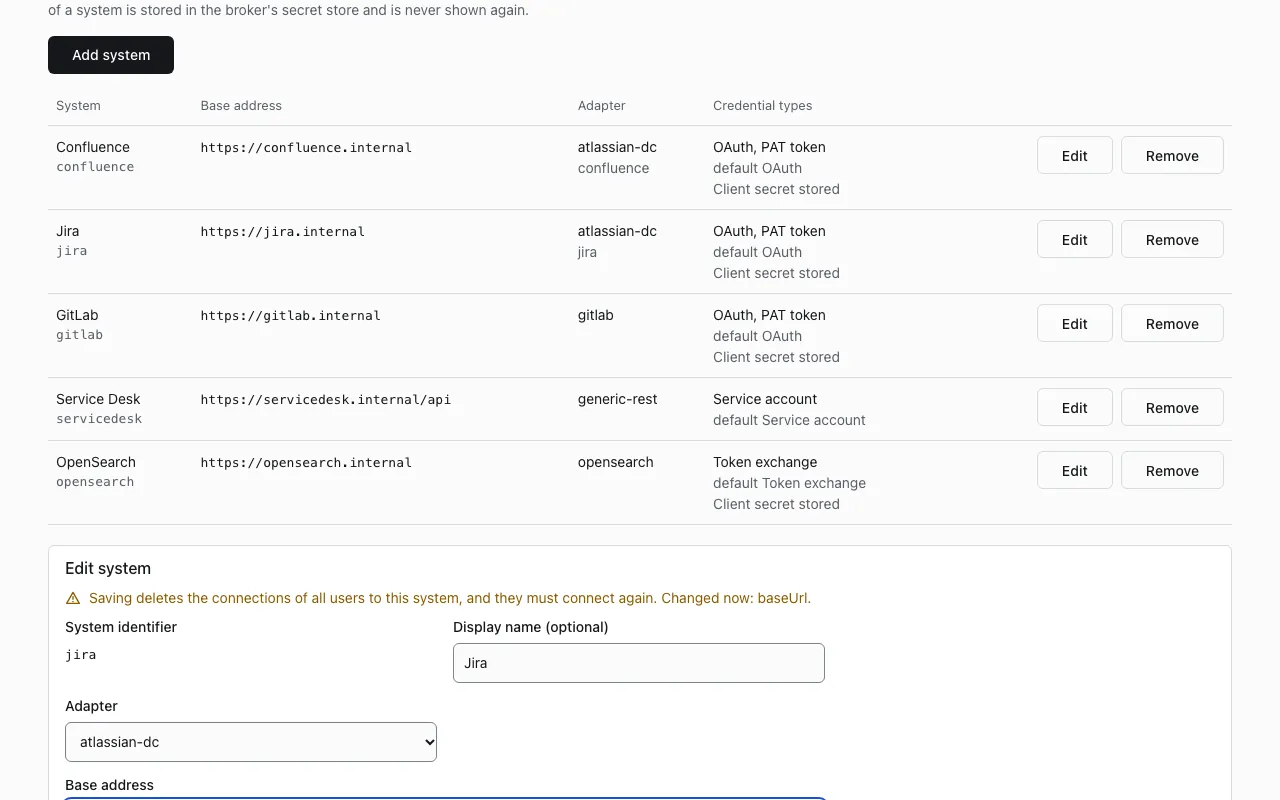
Remove a system
Section titled “Remove a system”Remove deletes the settings, the client secret and the connections of all users to this system. Nothing is sent to the product itself. Removing needs a fresh MFA. After that, tool calls for the system fail with system_not_configured.
Service accounts
Section titled “Service accounts”A service account is one account of the platform in the product, shared by all users of a system (for example a service desk where every call uses the same technical user). Users do not connect anything, and access is decided only by groups and the scope mapping, so give the account the least rights that the tools need.
A service account is possible with generic-rest only, with the credential type Service account. The key is not entered in the portal. An operator writes it to the OpenBao KV store, and the broker only reads it.
-
Add the system in the portal with the adapter
generic-restand the type Service account. -
Write the key to
secret/mcp/service-accounts/<system>, where<system>is the system identifier. Use a token of an OpenBao policy that may create and updatesecret/data/mcp/service-accounts/*. The policy of the broker itself may only read it.For a system with
Bearer,TokenorApiKeyscheme, write the credential as it goes after the scheme in the header:Terminal window bao kv put secret/mcp/service-accounts/<system> value=<service-account-token>For a system with the
Basicscheme, write the login and password. The broker builds the header value (the login must not contain a colon):Terminal window bao kv put secret/mcp/service-accounts/<system> username=<login> password=<password> -
If the key is rotated on a schedule, add the expiry date in RFC 3339 format, for example:
Terminal window bao kv put secret/mcp/service-accounts/<system> value=<service-account-token> expires_at=2027-06-30T00:00:00Z
Each bao kv put writes a new version of the whole entry, so repeat every field you want to keep.
In the Compose bundle
Section titled “In the Compose bundle”The bundle keeps no token that may write secrets: the root token is revoked after the first start, and the provisioner policy grants no path under secret/. OpenBao 2.7 also rejects bao operator generate-root without a token (since 2.6 the command uses the authenticated /sys/generate-root-token endpoint), so the unseal key alone does not give a new root token.
How it behaves:
- The broker does not cache the key. A rotation in OpenBao takes effect on the next call, and the gateway’s own cache holds a credential for at most 60 seconds.
- With
expires_atset, the broker bounds the cache to the time left. After that time the key counts as expired. - A missing entry, an entry without a usable
value(orusernameandpassword), a value that is not a valid header token (for example with spaces), anexpires_atthat is not a timestamp and an expired key all fail closed: the broker answers503 upstream_unavailable, and nothing is sent to the product. - The broker’s OpenBao policy for
secret/data/mcp/service-accounts/*is read only. The key never reaches a browser, a log or the audit.